---
title: How can I export my PDF with my preferred file name?
description: Learn how to export your PDF with a custom file name in .STUDIO. Enter your preferred file name in the Export form before exporting, and your downloaded PDF will be named accordingly.
---
[Skip to content](https://support.lovethatdesign.studio/knowledge/how-can-i-export-my-pdf-with-my-preferred-file-name#main-content)

- [Knowledge base](https://28lightbulbs.hubspotpagebuilder.com/blog)
Open main navigation
Close main navigation
- [Knowledge base](https://28lightbulbs.hubspotpagebuilder.com/blog)
Hello there! How can we help you?
- There are no suggestions because the search field is empty.
1. [Knowledgebase](https://support.lovethatdesign.studio/knowledge?hsLang=en)
2. [FAQs](https://support.lovethatdesign.studio/knowledge/faqs?hsLang=en)
# How can I export my PDF with my preferred file name?
You can set your preferred file name before exporting your PDF, so you won't need to rename it after downloading.
1. Open your project and click **Export**.
2. The **Export** form will open.
3. In the **File Name** field at the top of the form, enter your preferred file name.
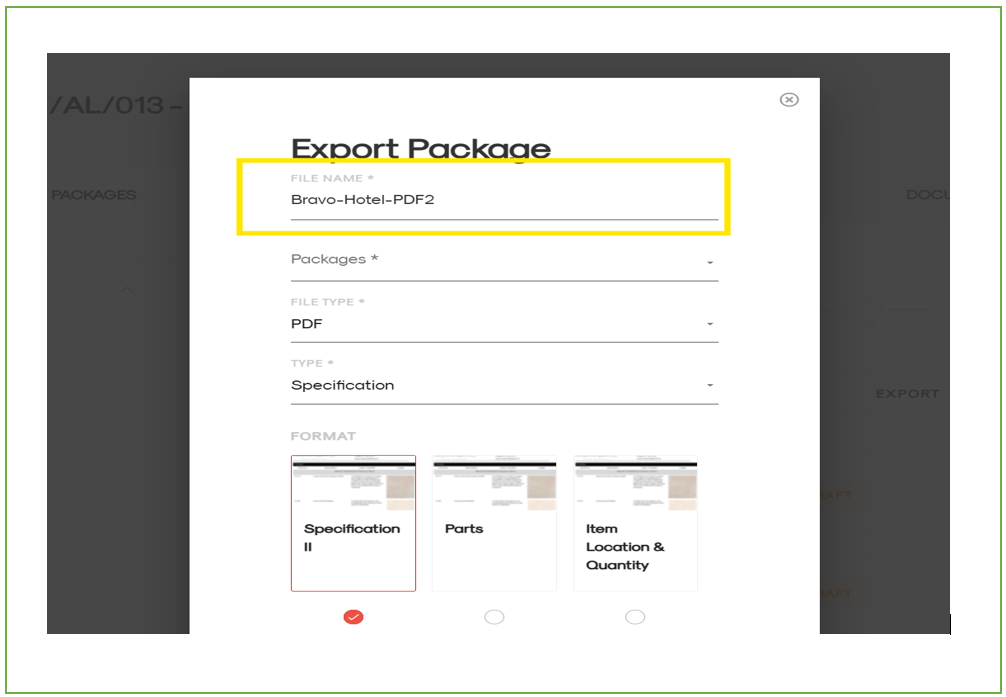
4. Complete any remaining export options as required.
5. Click **Export**.
Your PDF will be downloaded using the file name you entered.
- [Getting Started](https://support.lovethatdesign.studio/knowledge/getting-started?hsLang=en#main-content)
- [Settings](https://support.lovethatdesign.studio/knowledge/getting-started?hsLang=en#settings)
- [Address Book](https://support.lovethatdesign.studio/knowledge/address-book?hsLang=en)
- [Project](https://support.lovethatdesign.studio/knowledge/project?hsLang=en#main-content)
- [Packages](https://support.lovethatdesign.studio/knowledge/project?hsLang=en#packages)
- [Planning](https://support.lovethatdesign.studio/knowledge/project?hsLang=en#planning)
- [Sections](https://support.lovethatdesign.studio/knowledge/project?hsLang=en#sections)
- [Activity](https://support.lovethatdesign.studio/knowledge/project?hsLang=en#activity)
- [Notes](https://support.lovethatdesign.studio/knowledge/project?hsLang=en#notes)
- [Documents](https://support.lovethatdesign.studio/knowledge/project?hsLang=en#documents)
- [Finance](https://support.lovethatdesign.studio/knowledge/project?hsLang=en#finance)
- [Team](https://support.lovethatdesign.studio/knowledge/project?hsLang=en#team)
- [History](https://support.lovethatdesign.studio/knowledge/project?hsLang=en#history)
- [Group](https://support.lovethatdesign.studio/knowledge/project?hsLang=en#group)
- [Project Management](https://support.lovethatdesign.studio/knowledge/project?hsLang=en#project-management)
- [Item](https://support.lovethatdesign.studio/knowledge/project?hsLang=en#item)
- [Export](https://support.lovethatdesign.studio/knowledge/project?hsLang=en#export)
- [Opportunity](https://support.lovethatdesign.studio/knowledge/opportunity?hsLang=en#main-content)
- [Notes](https://support.lovethatdesign.studio/knowledge/opportunity?hsLang=en#notes)
- [Activity](https://support.lovethatdesign.studio/knowledge/opportunity?hsLang=en#activity)
- [Timeline](https://support.lovethatdesign.studio/knowledge/opportunity?hsLang=en#timeline)
- [Estimates](https://support.lovethatdesign.studio/knowledge/opportunity?hsLang=en#estimates)
- [Documents](https://support.lovethatdesign.studio/knowledge/opportunity?hsLang=en#documents)
- [Team](https://support.lovethatdesign.studio/knowledge/opportunity?hsLang=en#team)
- [History](https://support.lovethatdesign.studio/knowledge/opportunity?hsLang=en#history)
- [Overview](https://support.lovethatdesign.studio/knowledge/opportunity?hsLang=en#overview)
- [Timesheets](https://support.lovethatdesign.studio/knowledge/timesheets?hsLang=en)
- [Resources](https://support.lovethatdesign.studio/knowledge/resources?hsLang=en)
- [FAQs](https://support.lovethatdesign.studio/knowledge/faqs?hsLang=en#main-content)
- [Invoice](https://support.lovethatdesign.studio/knowledge/faqs?hsLang=en#invoice)
- [Leave](https://support.lovethatdesign.studio/knowledge/faqs?hsLang=en#leave)
- [Terminology](https://support.lovethatdesign.studio/knowledge/faqs?hsLang=en#terminology)
- [What's New?](https://support.lovethatdesign.studio/knowledge/whats-new?hsLang=en#main-content)
- [Year - 2023](https://support.lovethatdesign.studio/knowledge/whats-new?hsLang=en#year-2023)
- [Year -2024](https://support.lovethatdesign.studio/knowledge/whats-new?hsLang=en#year-2024)
- [Data and Insights](https://support.lovethatdesign.studio/knowledge/data-and-insights?hsLang=en)
- [Customization](https://support.lovethatdesign.studio/knowledge/customization?hsLang=en)
- [.STUDIO Support](https://support.lovethatdesign.studio/knowledge/studio-support?hsLang=en)
- [Widgets](https://support.lovethatdesign.studio/knowledge/widgets?hsLang=en)
- [Knowledge base](https://28lightbulbs.hubspotpagebuilder.com/blog)
[](https://get.lovethatdesign.studio/?hsLang=en)
Copyright © 2026, Love That Design