---
title: How to Add an Existing Part to an Item
description: Learn how to link an existing part to an item by searching for and selecting a previously created part from the Details tab. No need to create a new part.
---
[Skip to content](https://support.lovethatdesign.studio/knowledge/how-to-add-an-existing-part-to-an-item#main-content)

- [Knowledge base](https://28lightbulbs.hubspotpagebuilder.com/blog)
Open main navigation
Close main navigation
- [Knowledge base](https://28lightbulbs.hubspotpagebuilder.com/blog)
Hello there! How can we help you?
- There are no suggestions because the search field is empty.
1. [Knowledgebase](https://support.lovethatdesign.studio/knowledge?hsLang=en)
2. [Project](https://support.lovethatdesign.studio/knowledge/project?hsLang=en)
3. [Item](https://support.lovethatdesign.studio/knowledge/project?hsLang=en#item)
# How to Add an Existing Part to an Item
If a part has already been created, you can link it to an item without creating a new part. Follow the steps below.
Steps
1. Open the required **Project**. Navigate to the appropriate **Package**.
2. Open the item you want to link the part to.
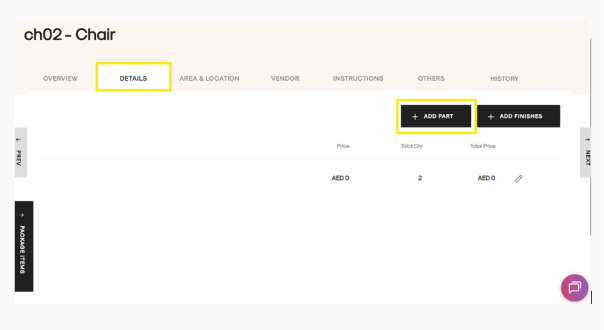
3. Open the **Details** tab. Under the **Details** tab, click **Add Parts**.
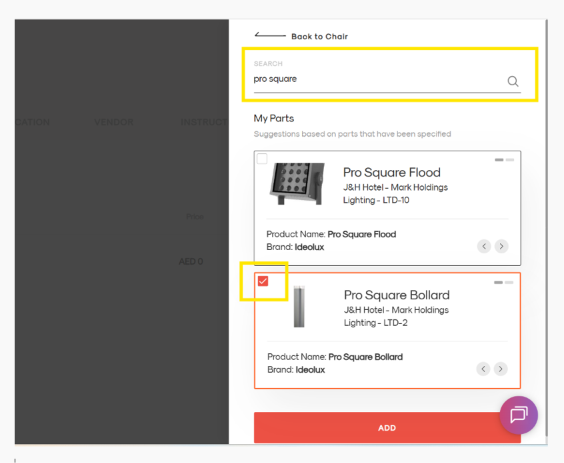
4. In the search field, enter the name of the part you want to link.
5. The search will display existing parts that have already been created.
6. Select the checkbox next to the required part.
7. Click the red **Add** button to link the selected part to the item.
Result
The selected part will now be linked to the item and will appear in the item's **Details** tab.
> **Note:** Only existing parts can be linked using this method. If the part does not appear in the search results, you will need to create a new part first.
- [Getting Started](https://support.lovethatdesign.studio/knowledge/getting-started?hsLang=en#main-content)
- [Settings](https://support.lovethatdesign.studio/knowledge/getting-started?hsLang=en#settings)
- [Address Book](https://support.lovethatdesign.studio/knowledge/address-book?hsLang=en)
- [Project](https://support.lovethatdesign.studio/knowledge/project?hsLang=en#main-content)
- [Packages](https://support.lovethatdesign.studio/knowledge/project?hsLang=en#packages)
- [Planning](https://support.lovethatdesign.studio/knowledge/project?hsLang=en#planning)
- [Sections](https://support.lovethatdesign.studio/knowledge/project?hsLang=en#sections)
- [Activity](https://support.lovethatdesign.studio/knowledge/project?hsLang=en#activity)
- [Notes](https://support.lovethatdesign.studio/knowledge/project?hsLang=en#notes)
- [Documents](https://support.lovethatdesign.studio/knowledge/project?hsLang=en#documents)
- [Finance](https://support.lovethatdesign.studio/knowledge/project?hsLang=en#finance)
- [Team](https://support.lovethatdesign.studio/knowledge/project?hsLang=en#team)
- [History](https://support.lovethatdesign.studio/knowledge/project?hsLang=en#history)
- [Group](https://support.lovethatdesign.studio/knowledge/project?hsLang=en#group)
- [Project Management](https://support.lovethatdesign.studio/knowledge/project?hsLang=en#project-management)
- [Item](https://support.lovethatdesign.studio/knowledge/project?hsLang=en#item)
- [Export](https://support.lovethatdesign.studio/knowledge/project?hsLang=en#export)
- [Opportunity](https://support.lovethatdesign.studio/knowledge/opportunity?hsLang=en#main-content)
- [Notes](https://support.lovethatdesign.studio/knowledge/opportunity?hsLang=en#notes)
- [Activity](https://support.lovethatdesign.studio/knowledge/opportunity?hsLang=en#activity)
- [Timeline](https://support.lovethatdesign.studio/knowledge/opportunity?hsLang=en#timeline)
- [Estimates](https://support.lovethatdesign.studio/knowledge/opportunity?hsLang=en#estimates)
- [Documents](https://support.lovethatdesign.studio/knowledge/opportunity?hsLang=en#documents)
- [Team](https://support.lovethatdesign.studio/knowledge/opportunity?hsLang=en#team)
- [History](https://support.lovethatdesign.studio/knowledge/opportunity?hsLang=en#history)
- [Overview](https://support.lovethatdesign.studio/knowledge/opportunity?hsLang=en#overview)
- [Timesheets](https://support.lovethatdesign.studio/knowledge/timesheets?hsLang=en)
- [Resources](https://support.lovethatdesign.studio/knowledge/resources?hsLang=en)
- [FAQs](https://support.lovethatdesign.studio/knowledge/faqs?hsLang=en#main-content)
- [Invoice](https://support.lovethatdesign.studio/knowledge/faqs?hsLang=en#invoice)
- [Leave](https://support.lovethatdesign.studio/knowledge/faqs?hsLang=en#leave)
- [Terminology](https://support.lovethatdesign.studio/knowledge/faqs?hsLang=en#terminology)
- [What's New?](https://support.lovethatdesign.studio/knowledge/whats-new?hsLang=en#main-content)
- [Year - 2023](https://support.lovethatdesign.studio/knowledge/whats-new?hsLang=en#year-2023)
- [Year -2024](https://support.lovethatdesign.studio/knowledge/whats-new?hsLang=en#year-2024)
- [Data and Insights](https://support.lovethatdesign.studio/knowledge/data-and-insights?hsLang=en)
- [Customization](https://support.lovethatdesign.studio/knowledge/customization?hsLang=en)
- [.STUDIO Support](https://support.lovethatdesign.studio/knowledge/studio-support?hsLang=en)
- [Widgets](https://support.lovethatdesign.studio/knowledge/widgets?hsLang=en)
- [Knowledge base](https://28lightbulbs.hubspotpagebuilder.com/blog)
[](https://get.lovethatdesign.studio/?hsLang=en)
Copyright © 2026, Love That Design