
You can update your Cover Page Information before exporting your file by following these steps:
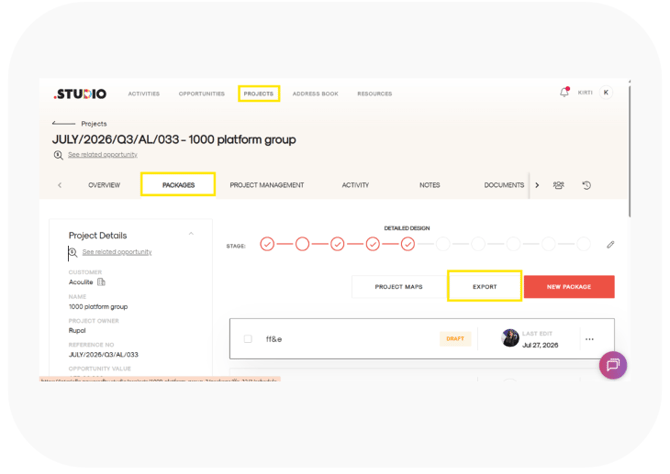
Step 1: Open Export
- Open your Project.
- Click Export.
- An export form will appear where you can enter the required export details.
Step 2: Open Cover Page Information
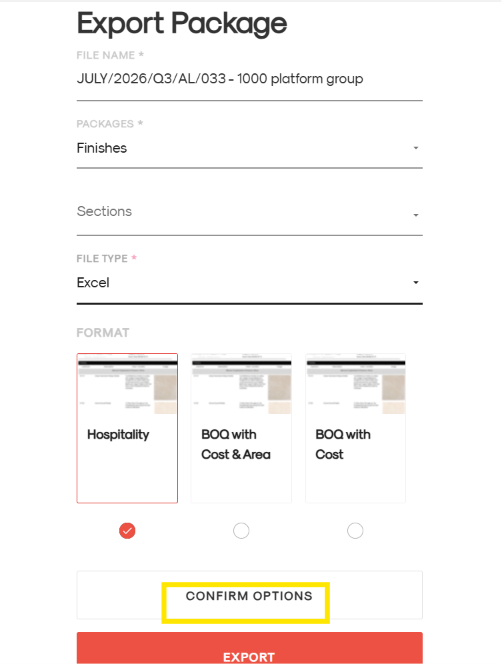
- Fill in all the required fields in the export form.
- Scroll down to the bottom of the form.
- Click Confirm Options, located just above the red Export button.
- The Cover Page Information page will open.
Step 3: Update Your Cover Page
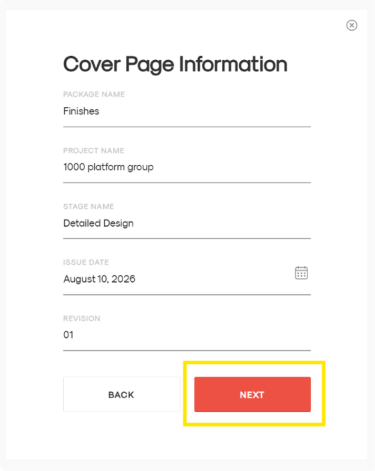
On the Cover Page Information page, you can update the details that you want to appear on the cover page of your exported file, such as:
- Package Name
- Project Name
- Stage Name
- Issue Date
- Revision
Update the information as required to ensure the correct details appear when the file is printed.
Step 4: Export Your File
- Once you have updated the cover page information, click Next.
- On the next page, click Export.
- Your file will be exported with the updated cover page information.